Automated Data Extraction Software: How It Works and How to Implement It
October 7, 2026
Manual data entry may look manageable when you're dealing with a handful of documents. But as invoices, receipts, bank statements, forms, and other business records start arriving every day, the workload can quickly become difficult to control.
Someone has to open each document, find the required information, type it into another system, check for mistakes, and repeat the process again and again.
That is where automated data extraction software can make a meaningful difference.
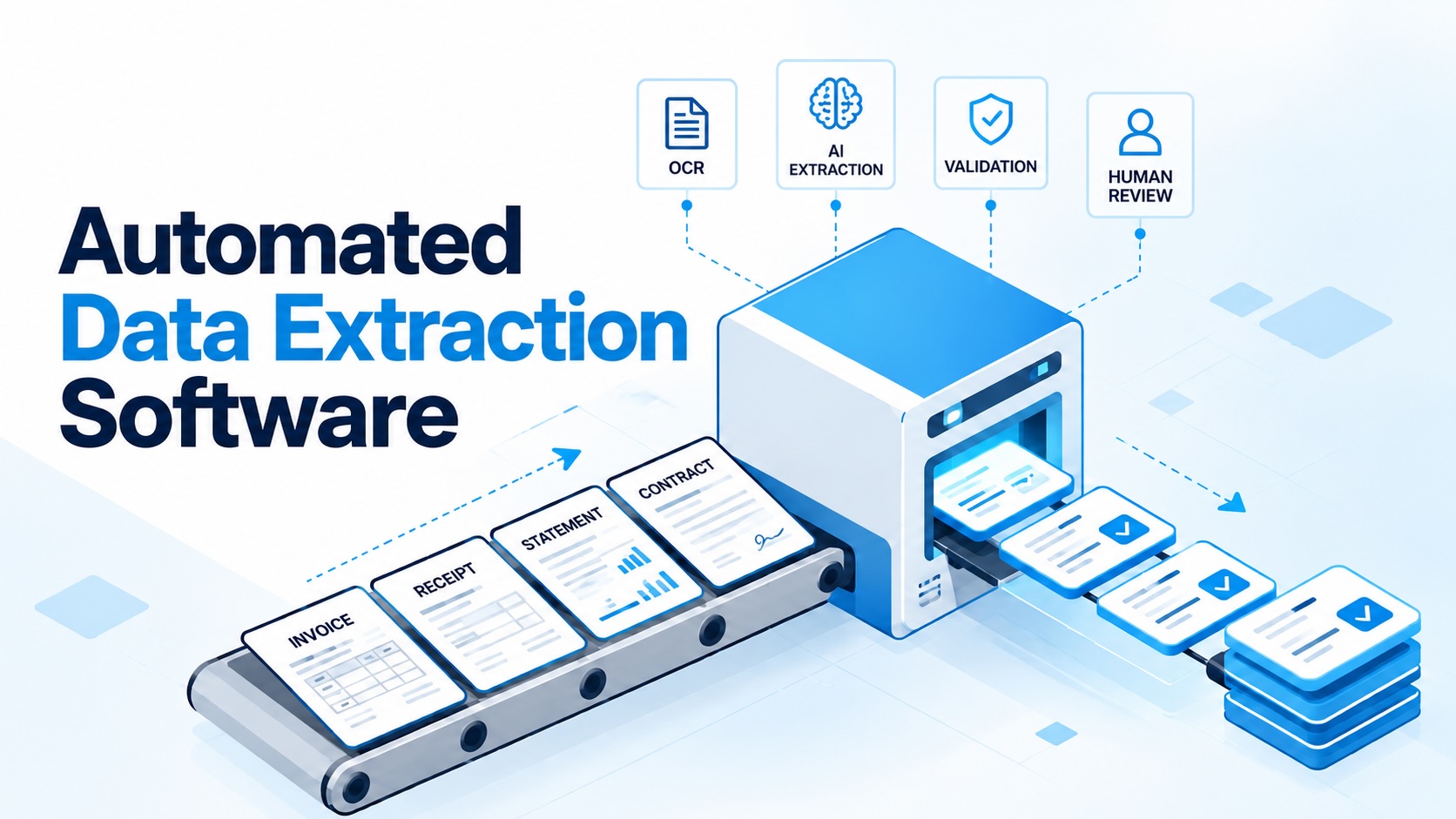
Instead of asking employees to retype information from every document, automated extraction technology reads the files, identifies the information you need, validates it, and sends structured data into your business systems. Modern solutions combine Optical Character Recognition (OCR), AI models, validation rules, and human review to create a much more efficient workflow.
For finance, operations, and IT teams, the real benefit isn't simply "automation." It's replacing repetitive typing with a process where people spend their time checking important information rather than entering every value manually.
In this guide, we'll look at how automated data extraction works, where it can be used, how it compares with traditional methods, and how businesses can introduce it without disrupting their existing workflows.
What Is Automated Data Extraction Software?
Automated data extraction software is designed to identify and capture specific information from documents and convert it into structured data that other business systems can use.
Instead of manually entering information from a document, the software reads the document and extracts the required fields.
For example, an invoice may contain:
- Supplier name
- Invoice number
- Invoice date
- Due date
- Line items
- Tax amount
- Total amount
A bank statement might contain:
- Account information
- Statement period
- Transaction dates
- Deposits
- Withdrawals
- Balances
The important point is that documents don't all present information in exactly the same way. Tables may span multiple pages, fields can move around, and different companies may use completely different layouts.
Modern extraction technology is designed to deal with these variations.
How Automated Data Extraction Software Works
Although the process can appear complicated from the outside, the basic workflow is relatively straightforward.
1. The document enters the system
Documents can come from different sources, including PDFs, scanned files, images, and other digital documents.
The system first identifies what kind of document it is dealing with.
A collection of files could contain invoices, receipts, statements, or other documents, and the extraction process needs to understand these differences before capturing the appropriate information.
2. OCR reads the document
OCR, or Optical Character Recognition, converts information displayed on a scanned page or image into machine-readable text.
Digital PDFs may not always need this step because their text can already be digitally available.
For scanned documents and images, however, OCR is an important part of the extraction process.
3. AI identifies the relevant fields
Once the document can be read, AI models identify the information that matters.
Rather than relying only on a fixed position on the page, AI-based extraction can understand what a field represents based on the document's content and layout.
This is particularly useful when different suppliers use different invoice designs.
4. The system assigns confidence scores
Automated extraction doesn't assume that every result is equally reliable.
The system can assign a confidence score to extracted information. Values that meet the required confidence level can move forward, while uncertain information can be sent to a person for review.
5. Rules validate the information
Validation rules provide another layer of protection.
They can check whether extracted information makes sense and identify values that may require attention.
This creates a useful combination:
OCR reads the document → AI finds the data → rules validate it → people review exceptions.
6. Structured data moves into another system
Once the information has been processed and reviewed where necessary, the structured data can be sent to another business application through an API, webhook, or supported export.
This eliminates the need to repeatedly copy information from one system into another.
What Does Automated Data Extraction Software Extract?
There are generally two major types of information that extraction systems need to understand.
Key-Value Data
This is information represented as a label and its corresponding value.
For example:
Statement Period: July 1 to July 31, 2026
Invoice Number: INV-1025
Total Amount: $1,250
The label may not always appear exactly where the system expects it, so AI can use the document's layout and context to determine what a value represents.
Tables and Line Items
Tables are more complicated.
Invoices may contain multiple line items, while bank statements can contain many transactions. Tables can also continue across several pages and use different column structures depending on the sender.
A capable document extraction software solution therefore needs to do more than simply read individual words. It must understand how information is organised within the document.
Automated Data Extraction vs. Manual Data Entry
The difference between the two approaches becomes obvious when document volumes increase.
Manual data entry
With a traditional process:
- Employees open each document.
- Required information is located manually.
- Values are typed into another system.
- Information is checked manually.
- Errors may only become visible later.
- Additional staff may be required during busy periods.
This approach becomes increasingly expensive as document volumes grow.
Automated extraction
With automated data extraction software:
- Documents are processed by the software.
- Required fields are identified automatically.
- Data is structured for business systems.
- Validation rules can identify potential errors.
- Uncertain information can be routed to human review.
- Processed values can be linked back to their source documents.
The biggest change is that employees move from typing every value to checking the values that actually need attention.
Templates, Rules or AI: Which Extraction Method Is Better?
Not all data extraction systems work in the same way.
Traditional templates and rules can be highly effective when documents consistently follow a small number of fixed layouts.
For example, if a company always receives the same document from the same sender, a fixed template can identify information based on predictable locations.
The problem appears when the sender changes the document design.
A field that previously appeared in one location may suddenly move somewhere else, causing a rigid template to fail.
AI-based extraction takes a different approach. Instead of depending entirely on where information appears, it can identify what the information represents based on the document's content and structure.
This makes AI particularly useful when businesses receive documents from many different sources.
However, AI is probabilistic. That's why confidence scores, validation rules, and human review remain important parts of a reliable workflow.
Where Is Automated Data Extraction Used?
The technology has applications across many industries and business processes.
Accounts Payable
Invoices, purchase orders, and receipts can be processed for matching, coding, and payment workflows.
Lending
Bank statements, pay stubs, tax returns, and identification documents can be processed to support income verification and underwriting.
Insurance
Insurance teams can extract information from forms, loss runs, and certificates of insurance.
Commercial Real Estate
Documents such as rent rolls, T-12s, and offering memorandums can be processed for property underwriting.
Logistics
Bills of lading, delivery notes, and customs documents can be extracted for tracking and freight billing.
For businesses handling large volumes of documents, the common benefit is the same: less manual entry and more structured information available for downstream processes.
How to Choose Document Extraction Software
Choosing the right document extraction software requires more than comparing subscription prices.
The most important question is whether the software performs well on your actual documents.
Here are several areas worth evaluating.
Accuracy
Test the software using real documents, including difficult scans. Field-level accuracy is more meaningful than a general accuracy claim.
Document Coverage
Look for pre-trained models that support your primary document types, along with the ability to train or configure new document types when necessary.
Table Extraction
If your documents contain transactions or invoice line items, make sure the system can handle tables, including multi-page tables.
Validation and Review
A strong workflow should allow rules to identify potential problems and give reviewers a clear way to see the extracted value alongside its original location on the document.
Integrations
Consider whether the solution provides APIs, webhooks, or useful export options so extracted data can reach the systems that actually need it.
Security
Businesses should also evaluate security requirements and relevant certifications, particularly when processing sensitive financial or customer information.
Most importantly, compare the total cost per document, rather than looking only at the advertised price per page. A cheaper tool that frequently sends documents for manual review may ultimately require more time and resources.
How to Implement Automated Data Extraction Software
Introducing automation doesn't mean changing every process at once.
A gradual rollout is usually more practical.
Step 1: Choose One Workflow
Start with a process that has a high document volume and is already well understood.
Invoice processing, for example, can be a practical starting point for an accounting team.
Step 2: Establish Your Baseline
Before introducing automation, understand your current process.
Measure:
- Number of documents processed each month
- Average processing time
- Error rate
- Existing backlog
- Amount of manual review required
Without a baseline, it becomes difficult to measure whether automation has actually improved the workflow.
Step 3: Define the Required Fields and Rules
Identify exactly what information needs to be extracted.
Also document the checks that employees currently perform manually.
These rules can then become part of the automated workflow.
Step 4: Test With Real Documents
Don't rely exclusively on sample documents provided by a software vendor.
Run a pilot using real files, including different layouts and lower-quality scans.
Measure field-level accuracy and determine how many documents can pass through without manual intervention.
Step 5: Establish Confidence Thresholds
Decide which extracted values can move forward automatically and which should be reviewed by a person.
This creates a practical balance between efficiency and accuracy.
Step 6: Integrate With Your Existing Systems
Once the extraction process is working reliably, connect it with the business system that needs the information.
This is where APIs, webhooks, and other integrations become particularly valuable.
Step 7: Expand Gradually
Once your first workflow is stable, introduce additional document types.
This approach allows your team to learn from the first implementation rather than trying to automate everything simultaneously.
How Zapier Desk Can Support Automated Data Extraction
For finance and accounting teams, document processing is often one of the most repetitive parts of the workflow.
Zapier Desk helps businesses approach this problem through automated document capture and data extraction, allowing teams to spend less time manually transferring information from financial documents.
Instead of repeatedly typing invoice or receipt information, businesses can use automated extraction to capture structured data and move it into their existing workflows.
This can help accounting teams:
- Reduce repetitive data entry.
- Process invoices and financial documents more efficiently.
- Extract important information from documents.
- Keep digital records organised.
- Route uncertain information for human review.
- Connect extracted information with downstream accounting processes.
The goal isn't to remove people from the process.
It's to make their time more valuable.
When software handles the repetitive extraction work, finance and operations professionals can concentrate on reviewing exceptions, validating important information, and keeping the broader workflow moving.
What Does Successful Automation Look Like?
A successful implementation isn't simply the one that extracts the most data.
The real objective is to create a workflow where automation handles the predictable work while people focus on the exceptions.
A useful process might look like this:
Document received → OCR → AI extraction → Validation → Confidence check → Human review when needed → Accounting or business system
This approach provides speed without abandoning oversight.
It also creates a clearer audit trail because extracted values can remain connected to their original location within the source document.
Conclusion
Automated data extraction software is changing how businesses handle document-heavy workflows.
Instead of employees spending hours typing information from invoices, statements, receipts, forms, and other documents, modern extraction systems can read the documents, identify important fields, validate the information, and deliver structured data to the systems that need it.
The technology works particularly well when OCR, AI, validation rules, confidence scores, and human review are combined.
But successful implementation isn't about switching on automation and hoping for the best.
Start with one high-volume workflow. Establish a baseline. Test the software using real documents. Define your required fields and validation rules. Set appropriate confidence thresholds, integrate the output with your existing systems, and expand only after the first workflow is stable.
For businesses considering document extraction software, that measured approach can turn automation from an interesting technology project into a practical improvement in everyday operations.
With solutions such as Zapier Desk, the objective is simple: replace repetitive typing with intelligent extraction and checking, while keeping people in control of the information that matters.
Frequently Asked Questions
Can data extraction be automated?
Yes. OCR can convert scanned documents into machine-readable text, while AI models identify the fields and tables a business needs. Validation rules and human review can then handle uncertain information.
What is automated data extraction software?
It is software that automatically identifies and captures specific information from documents such as invoices, receipts, bank statements, forms, and other business records, then converts it into structured data.
What is document extraction software used for?
Document extraction software can be used for invoice processing, accounts payable, lending, insurance, commercial real estate, logistics, and other workflows involving large volumes of documents.
Is automated data extraction the same as web scraping?
No. Document extraction reads information from files such as PDFs, scans, and images. Web scraping extracts information from websites and web pages. The two technologies serve different purposes.
What is the difference between automated data extraction and RPA?
RPA generally automates actions such as clicks and keystrokes between applications. Automated data extraction focuses on reading and understanding information inside documents. The two technologies can also be used together.
How accurate is automated data extraction?
Accuracy depends on the software, document types, layouts, and quality of the source files. Businesses should test extraction accuracy using their own documents, including difficult scans, before deploying the technology at scale.
How should a business start implementing automated data extraction?
Start with one high-volume, well-understood workflow. Establish your current processing time and error rate, test the software with real documents, define validation rules, establish confidence thresholds, integrate the output, and expand gradually once the workflow is stable.
Start your free trial today!
Follow Us On: Facebook, X, Instagram and YouTube.